Overview
LangGraph supports time travel through checkpoints:
- Replay: Retry from a prior checkpoint.
- Fork: Branch from a prior checkpoint with modified state to explore an alternative path.
Both work by resuming from a prior checkpoint. Nodes before the checkpoint are not re-executed (results are already saved). Nodes after the checkpoint re-execute, including any LLM calls, API requests, and interrupts (which may produce different results).
Replay
Invoke the graph with a prior checkpoint’s config to replay from that point.
Replay re-executes nodes — it doesn’t just read from cache. LLM calls, API requests, and interrupts fire again and may return different results. Replaying from the final checkpoint (no next nodes) is a no-op. 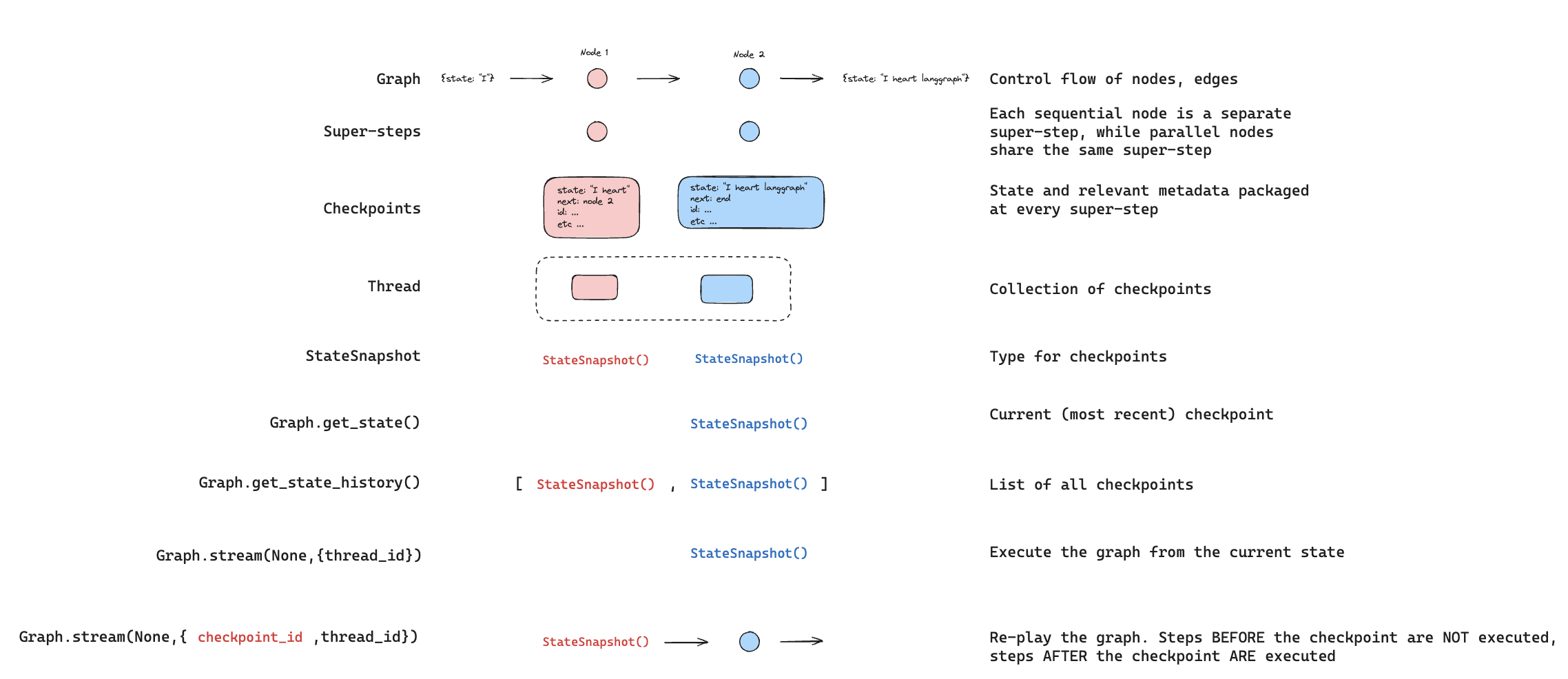 Use
Use get_state_history to find the checkpoint you want to replay from, then call invoke with that checkpoint’s config:
from langgraph.graph import StateGraph, START
from langgraph.checkpoint.memory import InMemorySaver
from typing_extensions import TypedDict, NotRequired
import uuid

class State(TypedDict):
    topic: NotRequired[str]
    joke: NotRequired[str]


def generate_topic(state: State):
    return {"topic": "socks in the dryer"}


def write_joke(state: State):
    return {"joke": f"Why do {state['topic']} disappear? They elope!"}


checkpointer = InMemorySaver()
graph = (
    StateGraph(State)
    .add_node("generate_topic", generate_topic)
    .add_node("write_joke", write_joke)
    .add_edge(START, "generate_topic")
    .add_edge("generate_topic", "write_joke")
    .compile(checkpointer=checkpointer)
)

# Step 1: Run the graph
config = {"configurable": {"thread_id": str(uuid.uuid4())}}
result = graph.invoke({}, config)

# Step 2: Find a checkpoint to replay from
history = list(graph.get_state_history(config))
# History is in reverse chronological order
for state in history:
    print(f"next={state.next}, checkpoint_id={state.config['configurable']['checkpoint_id']}")

# Step 3: Replay from a specific checkpoint
# Find the checkpoint before write_joke
before_joke = next(s for s in history if s.next == ("write_joke",))
replay_result = graph.invoke(None, before_joke.config)
# write_joke re-executes (runs again), generate_topic does not
Fork
Fork creates a new branch from a past checkpoint with modified state. Call update_state on a prior checkpoint to create the fork, then invoke with None to continue execution.

update_state does not roll back a thread. It creates a new checkpoint that branches from the specified point. The original execution history remains intact.
# Find checkpoint before write_joke
history = list(graph.get_state_history(config))
before_joke = next(s for s in history if s.next == ("write_joke",))

# Fork: update state to change the topic
fork_config = graph.update_state(
    before_joke.config,
    values={"topic": "chickens"},
)

# Resume from the fork — write_joke re-executes with the new topic
fork_result = graph.invoke(None, fork_config)
print(fork_result["joke"])  # A joke about chickens, not socks
From a specific node
When you call update_state, values are applied using the specified node’s writers (including reducers). The checkpoint records that node as having produced the update, and execution resumes from that node’s successors.
By default, LangGraph infers as_node from the checkpoint’s version history. When forking from a specific checkpoint, this inference is almost always correct.
Specify as_node explicitly when:
- Parallel branches: Multiple nodes updated state in the same step, and LangGraph can’t determine which was last (
InvalidUpdateError).
- No execution history: Setting up state on a fresh thread (common in testing).
- Skipping nodes: Set
as_node to a later node to make the graph think that node already ran.
# graph: generate_topic -> write_joke

# Treat this update as if generate_topic produced it.
# Execution resumes at write_joke (the successor of generate_topic).
fork_config = graph.update_state(
    before_joke.config,
    values={"topic": "chickens"},
    as_node="generate_topic",
)
Interrupts
If your graph uses interrupt for human-in-the-loop workflows, interrupts are always re-triggered during time travel. The node containing the interrupt re-executes, and interrupt() pauses for a new Command(resume=...).
from langgraph.types import interrupt, Command

class State(TypedDict):
    value: list[str]

def ask_human(state: State):
    answer = interrupt("What is your name?")
    return {"value": [f"Hello, {answer}!"]}

def final_step(state: State):
    return {"value": ["Done"]}

graph = (
    StateGraph(State)
    .add_node("ask_human", ask_human)
    .add_node("final_step", final_step)
    .add_edge(START, "ask_human")
    .add_edge("ask_human", "final_step")
    .compile(checkpointer=InMemorySaver())
)

config = {"configurable": {"thread_id": "1"}}

# First run: hits interrupt
graph.invoke({"value": []}, config)
# Resume with answer
graph.invoke(Command(resume="Alice"), config)

# Replay from before ask_human
history = list(graph.get_state_history(config))
before_ask = [s for s in history if s.next == ("ask_human",)][-1]

replay_result = graph.invoke(None, before_ask.config)
# Pauses at interrupt — waiting for new Command(resume=...)

# Fork from before ask_human
fork_config = graph.update_state(before_ask.config, {"value": ["forked"]})
fork_result = graph.invoke(None, fork_config)
# Pauses at interrupt — waiting for new Command(resume=...)

# Resume the forked interrupt with a different answer
graph.invoke(Command(resume="Bob"), fork_config)
# Result: {"value": ["forked", "Hello, Bob!", "Done"]}
Multiple interrupts
If your graph collects input at several points (for example, a multi-step form), you can fork from between the interrupts to change a later answer without re-asking earlier questions.
def ask_name(state):
    name = interrupt("What is your name?")
    return {"value": [f"name:{name}"]}

def ask_age(state):
    age = interrupt("How old are you?")
    return {"value": [f"age:{age}"]}

# Graph: ask_name -> ask_age -> final
# After completing both interrupts:

# Fork from BETWEEN the two interrupts (after ask_name, before ask_age)
history = list(graph.get_state_history(config))
between = [s for s in history if s.next == ("ask_age",)][-1]

fork_config = graph.update_state(between.config, {"value": ["modified"]})
result = graph.invoke(None, fork_config)
# ask_name result preserved ("name:Alice")
# ask_age pauses at interrupt — waiting for new answer
Subgraphs
Time travel with subgraphs depends on whether the subgraph has its own checkpointer. This determines the granularity of checkpoints you can time travel from.
By default, a subgraph inherits the parent’s checkpointer. The parent treats the entire subgraph as a single super-step — there is only one parent-level checkpoint for the whole subgraph execution. Time traveling from before the subgraph re-executes it from scratch.You cannot time travel to a point between nodes in a default subgraph — you can only time travel from the parent level.# Subgraph without its own checkpointer (default)
subgraph = (
StateGraph(State)
.add_node("step_a", step_a) # Has interrupt()
.add_node("step_b", step_b) # Has interrupt()
.add_edge(START, "step_a")
.add_edge("step_a", "step_b")
.compile() # No checkpointer — inherits from parent
)
graph = (
StateGraph(State)
.add_node("subgraph_node", subgraph)
.add_edge(START, "subgraph_node")
.compile(checkpointer=InMemorySaver())
)
config = {"configurable": {"thread_id": "1"}}
# Complete both interrupts
graph.invoke({"value": []}, config) # Hits step_a interrupt
graph.invoke(Command(resume="Alice"), config) # Hits step_b interrupt
graph.invoke(Command(resume="30"), config) # Completes
# Time travel from before the subgraph
history = list(graph.get_state_history(config))
before_sub = [s for s in history if s.next == ("subgraph_node",)][-1]
fork_config = graph.update_state(before_sub.config, {"value": ["forked"]})
result = graph.invoke(None, fork_config)
# The entire subgraph re-executes from scratch
# You cannot time travel to a point between step_a and step_b
Set checkpointer=True on the subgraph to give it its own checkpoint history. This creates checkpoints at each step within the subgraph, allowing you to time travel from a specific point inside it — for example, between two interrupts.Use @[get_state] with subgraphs=True to access the subgraph’s own checkpoint config, then fork from it:# Subgraph with its own checkpointer
subgraph = (
StateGraph(State)
.add_node("step_a", step_a) # Has interrupt()
.add_node("step_b", step_b) # Has interrupt()
.add_edge(START, "step_a")
.add_edge("step_a", "step_b")
.compile(checkpointer=True) # Own checkpoint history
)
graph = (
StateGraph(State)
.add_node("subgraph_node", subgraph)
.add_edge(START, "subgraph_node")
.compile(checkpointer=InMemorySaver())
)
config = {"configurable": {"thread_id": "1"}}
# Run until step_a interrupt
graph.invoke({"value": []}, config)
# Resume step_a -> hits step_b interrupt
graph.invoke(Command(resume="Alice"), config)
# Get the subgraph's own checkpoint (between step_a and step_b)
parent_state = graph.get_state(config, subgraphs=True)
sub_config = parent_state.tasks[0].state.config
# Fork from the subgraph checkpoint
fork_config = graph.update_state(sub_config, {"value": ["forked"]})
result = graph.invoke(None, fork_config)
# step_b re-executes, step_a's result is preserved

